Saturday, March 05, 2011

Kindle or Nook? Or both.


Last Xmas I gave my wife a Kindle (the Wi-Fi only kind).  No set up, just turn on and nice-looking black text on off-white background appears.  I was never very interested in e-readers, but was I wrong.  It is really relaxing to read on them and wonderfully convenient to hold a small device instead of a hardcover tomb.  Having access to several books at any one time is also nice.  My strong interest in the device did not please the original recipient, so I had to let go of her gift.  Unfair.

I had been looking at Kindle and Nook, so decided to get a nook (Wi-Fi only) for myself.  Now I can compare these two mainstream e-readers.  There are differences, but both are perfectly fine book readers.  The kindle appear a touch brighter (contrasty), although this is not really visible in normal light conditions.  Page turning is about as fast for both, after the 1.5 Nook software upgrade (came soon after I first connected with BN’s nook site).  The differences are under the hood and in the supporting interface.  The Kindle has a button keyboard for notes, and apps that are reached through a basic pop-up window.  The immediate advantage is a battery life that is vastly better than Nook’s.  The Nook offers a more stylish color touchscreen bar that offers a much nicer experience, but demands more electrons.  I found that the Kindle lasts ~3 weeks with normal use and the Nook ~1 week on a battery charge.  Quite different, reflecting the Nook interface that turns on and off like a phone screen.  I prefer the Nook’s navigation bar, but the battery life makes the Kindle more portable and less distracting; Kindle is my wife’s preference.
The readers both have apps that are useful and fun.  Each has a basic web browser that is hard to navigate, but allows internet access.  No Flash, video and such, but basic mobile sites work well.  You can install games on both.  I bought Sudoku for the Kindle, which came free with the Nook.  Works pretty well on both, but uses more battery on Nook because of the navigation bar (doubling as keyboard).

So, which one is better?  It really does not matter if you just want to read a book or paper.  The battery life of Kindle is best and it has a slight edge with brightness.  The amazon format of books, however, is limiting.  No epub and pdf format and thus no public library downloads.  I have Calibre which takes care of file conversions, so the format issue between units is resolved.  The download of papers and magazines from Calibre, by the way, is a great feature that even allows emailing your Kindle for a small fee (the Nook and Kindle are otherwise attached to the PC for uploading).  Calibre is worth the shareware donation.

My wife and I each read 3 books and have turned to reading more than in recent past.  I do not miss the book, other than its tactile aspect, because I never randomly page through a novel.  It does not replace web browsing by any stretch and reading the paper is only ok for full articles.  Some friends have turned to iPad and Galaxies as their readers, but a backlit screen cannot compete with e-ink when it comes to eye strain.  Having a dedicated reader also removes the distractions a portable computer has, such as email, text pop-ups.

I am an e-reader convert.

Thursday, November 18, 2010

Facebook's Page and App functionality

Over the last couple of weeks I looked into the use of Facebook in the college learning environment.  I won’t go into my motivation, except that Facebook is, of course, today’s It application.  I abandoned Twitter as an educational platform.

Two paths are available, called Page (also Fan Page) and App.  You’ll find lots of info on this and examples from a quick search, although some write-ups are a little dense.
A Page is something everyone can create in Facebook’s environment, while an App is hosted locally by the owner’s server.  Practically, a Page is limited by Facebook’s built-in (but growing) functionality, while an App only uses aspects of Facebook with modules, but otherwise its functionality is not restricted.  

Today’s Facebook Pages allow customization that mostly remove the need for an Apps, it seems.  On a Page you can add tabs that open windows that use fbml, which is Facebook’s html.  You can simply code in html (like Dreamweaver) and remove the <body> and </body> commands, and paste the rest of the html code into the Facebook tab.  You’ll need only little more knowledge than this (and many explanations via Googling), unless you do not know what html code is.
My example GC page is: http://www.facebook.com/pages/U-M-Global-Change/126421510748629.  Notice the personalized tabs.

An App allows you to make your own website and open it in Facebook (Facebook uses the iframe protocol for this, if you want to know).  The advantage is that you do not need to do anything but adjust the size of your website so that is fits the Facebook window (~720px).  You can keep your site as is and add Facebook modules such a comments, links, notes.  You need to register the App with Facebook (returning a unique ID) and tweak the canvas page by adding the site’s address.  Oddly, the local site is only identified by its folder, not file name, so make sure the default page is index.html or index.php.  My corresponding GC App is here: http://apps.facebook.com/um-globalchange/.  I did not include any Facebook modules in this page (other than a link icon), but you can click on links in that window just like in a browser.

What works best?
For now (and convenience), I stick with the Page option, because the App has higher maintenance demands when including Facebook modules, and relies on your own server’s availability (and security limits).  It seems that posting is better controlled by App than Page (hence some odd postings on my personal page), but this is at worst only inconvenient for one’s friends (and perhaps even informative for one’s friends).

I’ll try this for a while …..


Tuesday, November 16, 2010

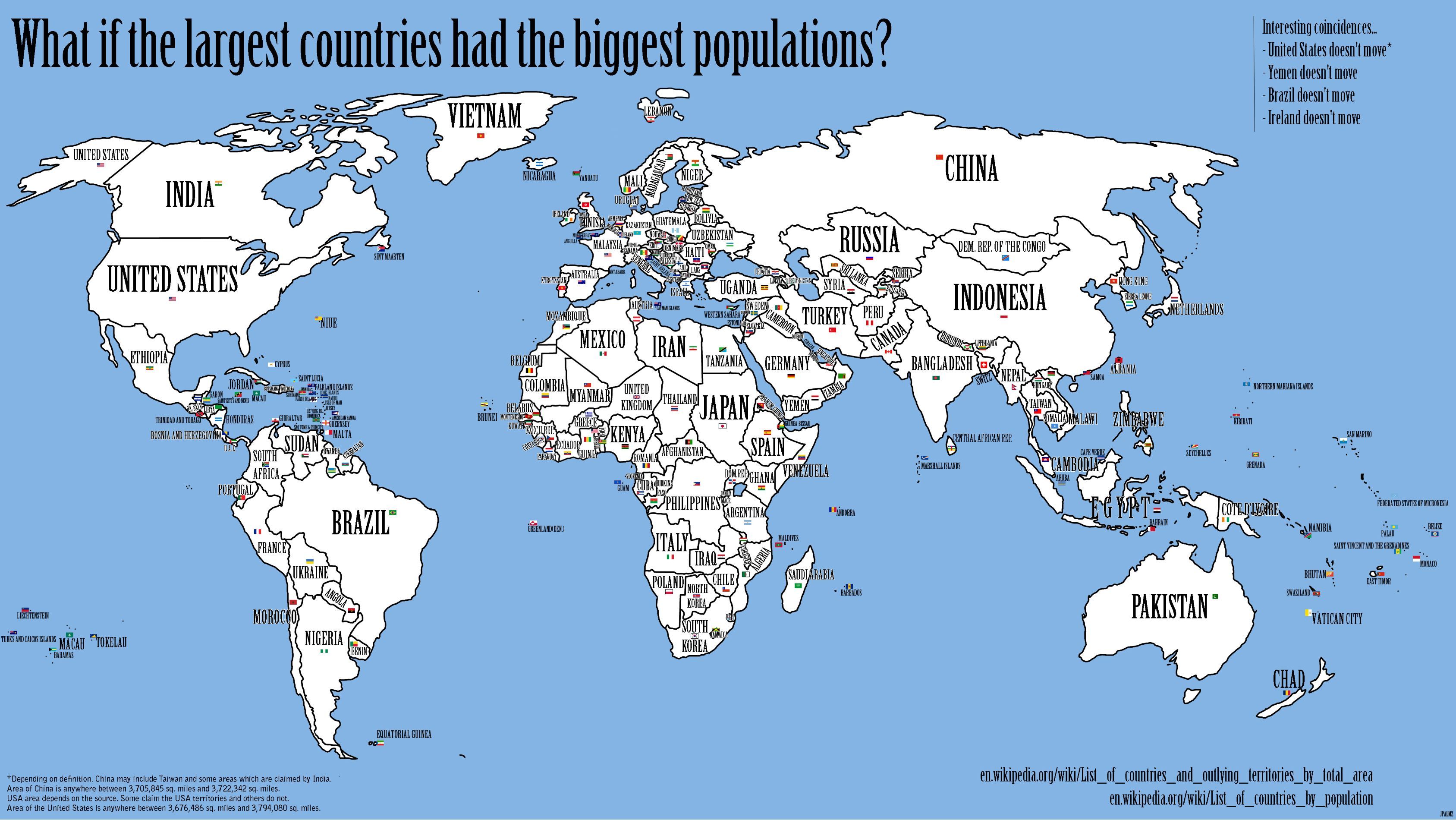
Population demographics

I have started to work on a set of lectures on population dynamics and I find this image. Brilliant approach and eye opening. Instead of using changing country sizes by population ("balloon maps"), this shift populations to counties by approx area.
c6Agr.jpg (3375×1900)

Saturday, October 30, 2010

Windows Live Mesh


Moved to Live Mesh, because Live Sync will stop in a couple of months. The migration is not as easy as one would expect/hope. Most files were synced, but quite a few kept "waiting to sync". Turns out that many are old files of different editions among various connected computers. Never was an issue with Live Sync. For example, many of the albumart jpgs in music folder gave problems. Deleting the problem files is the solution, although a few needed to be re-downloaded.
Another issue is the initial MOE demand on the CPU. When the program first starts it fully consumes CPU, but this drops to a few % after the computer has synced (can take hours over wireless connection with large folders). It now behaves the same as live sync and foldershare before that, so no concerns.
I use the cloud storage for one folder, allowing access from other computers. Good for talks and class materials when the laptop fails.